 +86 13717134343





- Home
- Products
- Solutions
- About Us
- Support
-
 CONTACT PDS+86 13717134343
-
 CONTACT PDS
-
 CONTACT PDS

Choosing the right Vehicle Mount Ipad in 2026 requires more than checking compatibility. Fleet teams now examine visibility, vibration control, charging access, and installation time. A mount may look strong in a showroom, yet loosen after months on rough roads. That difference matters.
John Gamber, founder of Gamber-Johnson, offers a useful industry principle: “A reliable mount should support the job without becoming part of the problem.” This idea guides our review of the leading 2026 types. Dashboard mounts suit delivery vans and service vehicles. Seat-rail mounts preserve dashboard space. Headrest systems support passenger use, training, and mobile inspections. Heavy-duty floor and console designs serve patrol, utility, and logistics environments. Each type solves a different problem.
Real-world details often decide the better option. Can a driver reach the screen without leaning forward? Does the arm shake when a vehicle crosses a pothole? Can a technician remove the iPad with one hand? These questions expose weak designs quickly. They also reveal an uncomfortable truth: no single Ipad Vehicle Mount fits every cabin. Some mounts sacrifice adjustability for strength. Others offer flexibility but need tighter inspection. Our comparison considers materials, locking systems, cable routing, charging support, and tablet-case clearance. It also recognizes that installation quality affects performance. Even an excellent design can fail when positioned poorly. The 2026 market looks more capable, but not automatically better. Readers should test each mount against their routes, users, and working conditions before choosing a final solution.
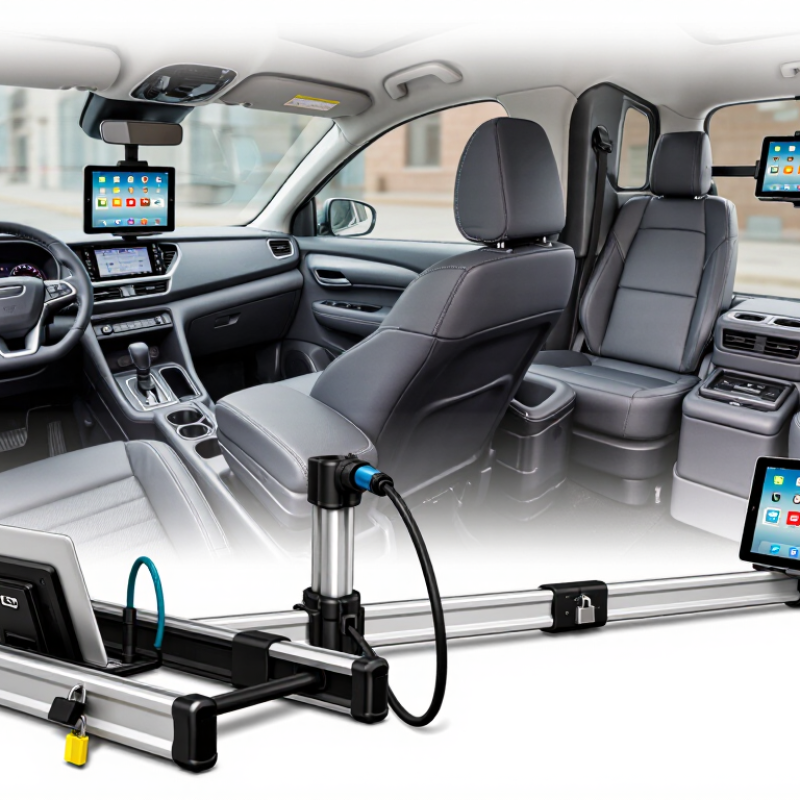
What Defines a Vehicle-Mounted iPad System in 2026?
What Defines a Vehicle-Mounted iPad System in 2026?
A vehicle-mounted iPad system is more than a tablet on a dashboard. It combines a secure mount, power delivery, charging control, and a driver-safe viewing position. The strongest systems also manage heat, vibration, cable movement, and quick removal. Small details matter. A loose connector can stop a route.
Berg Insight reported more than 16 million active fleet-management systems in Europe during 2023. That growth shows why vehicle displays now support dispatching, navigation, inspections, digital forms, and controlled communication. The leading 2026 types include fixed dashboard mounts, rugged locking docks, headrest mounts for passengers, and multi-device consoles for service vehicles. Each type serves a different workflow. A delivery driver needs visibility and one-hand access. A rear-seat passenger needs angle adjustment and impact-conscious installation.
Safety still defines the system. The U.S. National Highway Traffic Safety Administration recorded 3,275 distraction-related traffic deaths in 2023. Therefore, an effective mount should keep essential information near eye level without blocking road views, controls, or airbags. It should also support voice interaction and limited-touch workflows. Compliance remains installation-dependent. A certified-looking bracket is not automatically safe in every vehicle.
The industry still has a weakness: many products focus on tablet compatibility, not the complete cabin environment. Heat, glare, theft risk, and poor cable routing are often discovered after deployment. That is an expensive lesson. Real-world testing should include rough roads, night glare, winter gloves, and emergency removal. A perfect specification sheet may still fail on Monday morning.
What Are the 2026 Top Vehicle Mount iPad Types? – What Defines a Vehicle-Mounted iPad System in 2026?
A practical comparison of the main vehicle-mounted tablet configurations and the system features that define safe, reliable in-vehicle use.
| Vehicle Mount Type | Typical Mounting Location | Best-Fit Vehicle Use | Core System Components | Power Approach | Primary Strengths | Main Limitations | 2026 Relevance |
|---|---|---|---|---|---|---|---|
| Dashboard or Console Mount | Dashboard, center console, or a reinforced horizontal surface | Navigation, dispatch, route planning, field-service records, and fleet communication | Adjustable cradle, rigid mounting base, vibration-resistant hardware, charging cable, and optional data connection | Vehicle USB or 12-volt accessory circuit; hardwired power is preferred for continuous duty | Good forward visibility, easy access for the driver, and broad compatibility with common tablet sizes | Can obstruct controls or sight lines if poorly positioned; installation must account for airbags and vehicle regulations | High |
| Headrest Mount | Rear face of a front-seat headrest | Rear-passenger entertainment, education, travel information, and supervised content viewing | Headrest brackets, adjustable viewing arm, device cradle, cable routing, and optional headphones or audio connection | Rear-seat USB outlet, portable battery, or a routed low-voltage charging cable | Fast installation, convenient rear-seat viewing, and minimal impact on the driver’s dashboard area | Primarily intended for passengers; headrest geometry and seat movement can affect fit and viewing angle | High |
| Seat-Rail or Floor-Post Mount | Passenger-seat rail, floor post, or center-floor mounting point | Professional fleets, mobile workstations, inspections, logistics, and shared commercial vehicles | Metal floor or rail bracket, articulated arm, locking tablet cradle, cable management, and optional keyboard surface | Hardwired vehicle power, protected USB-C charging, or a regulated accessory circuit | Strong mechanical support, flexible positioning, and better suitability for frequent daily use | Requires careful installation; may reduce legroom or interfere with seat adjustment | Very High |
| Suction-Cup Mount | Windshield or smooth dashboard surface | Temporary navigation, rental vehicles, short-term field work, and occasional personal use | Vacuum or suction base, adjustable arm, tablet holder, and charging lead | 12-volt outlet or vehicle USB port | Portable, removable, and generally requires no permanent vehicle modification | Performance depends on surface quality, temperature, vibration, and correct placement outside regulated viewing zones | Moderate |
| Floor or Console Pedestal Mount | Vehicle floor, center console, or a dedicated equipment platform | Delivery vehicles, emergency response, utility fleets, and high-use mobile workstations | Reinforced pedestal, locking cradle, articulated arm, shock-resistant joints, cable protection, and optional peripherals | Fused hardwired circuit with voltage regulation and professional cable routing | High stability, long-term durability, and strong support for data-entry accessories | More expensive and time-consuming to install; may require vehicle-specific engineering | Very High |
| Protective Rugged-Cradle Mount | Dashboard, seat rail, floor post, or equipment rack | Construction, public safety, utilities, warehousing, and other high-vibration work environments | Protective tablet enclosure, locking mechanism, reinforced mounting plate, shock isolation, and sealed cable connection | Regulated hardwired power or protected USB-C charging with strain relief | Improved impact protection, tamper resistance, vibration tolerance, and reliable operation in demanding conditions | Heavier, bulkier, and less convenient to remove; enclosure compatibility must be verified before purchase | Very High |
| Passenger-Seat Arm Mount | Passenger seat rail or side-mounted seat bracket | Mobile sales, service appointments, customer check-in, and front-passenger productivity | Swivel arm, adjustable tablet cradle, locking joint, quick-release mechanism, and optional keyboard tray | Nearby vehicle USB outlet or concealed hardwired cable | Allows the device to be positioned for either the passenger or a stopped driver; useful for shared vehicles | Arm movement must be controlled to prevent interference with occupants, seat travel, or entry and exit | High |
| Integrated Fleet Dock | Dedicated dashboard, console, or equipment-panel cutout | Vehicles with standardized driver workflows, dispatch software, electronic forms, and centralized fleet management | Fixed dock, locking release, charging contacts, data interface, vehicle-specific bracket, and optional external antenna or controls | Fused vehicle circuit with continuous charging and protected data connectivity | Clean installation, rapid device docking, controlled access, and consistent positioning across a fleet | Higher installation cost and less flexibility when vehicle or tablet dimensions change | Very High |
What defines a vehicle-mounted iPad system in 2026? The system is more than a holder. It combines a mechanically secure mount, a compatible cradle or enclosure, regulated vehicle power, vibration and heat considerations, safe placement that preserves visibility and airbag zones, controlled device access, reliable connectivity, and a workflow that can be operated without creating unnecessary driver distraction.
Vehicle Tablet T7 with RTK GNSS: Market Trends Based on Gartner and MarketsandMarkets Reports
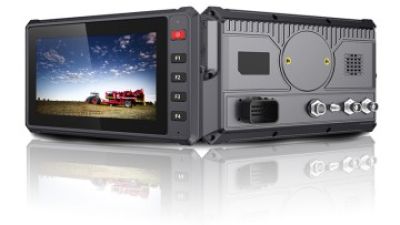
The Vehicle Tablet market is moving toward connected, rugged, and precision-oriented systems that support fleet digitalization, intelligent transportation, and advanced driver assistance. Industry market research highlights growing demand for edge computing, high-accuracy positioning, real-time vehicle data, and flexible platforms that can operate across commercial, agricultural, construction, and off-road applications. The T7 addresses these trends with an automotive-grade 64-bit quad-core ARM Cortex-A53 processor running at 1.5GHz. Its AEC-Q100 certification supports dependable performance in demanding temperature conditions, while Android 10 or Linux 4.9 with Qt 5 gives developers flexibility for telematics, autonomous driving, and in-vehicle infotainment projects.
A 7-inch 1024×600 IPS display with 750-nit brightness improves visibility in strong outdoor light. Integrated Rtk Gnss supports centimeter-level positioning through GPS, GLONASS, BeiDou, and Galileo, enabling precise navigation, surveying, fleet coordination, and machine control. Dual 720P camera inputs with real-time preview can support ADAS, driver monitoring, and parking assistance. The high-speed CAN FD interface is suitable for vehicle diagnostics and can be further developed for J1939, CANopen, and OBD-II applications. With 9–36V DC input and ISO 7637-II compliance, the tablet fits heavy-duty vehicles, tractors, excavators, mining equipment, boats, and electric charging systems. Its IP66 and MIL-STD-810G enclosure provides resistance to dust, water, vibration, and harsh field conditions.
FAQS
Common types include headrest, dashboard, windshield, seat-rail, floor-console, and between-seat mounts. Each suits a different cabin layout.
A headrest mount keeps the screen near passengers’ eye level. It suits viewing, reading, and rear-seat work. Test the locking points carefully.
Dashboard mounts offer quick access and usually better stability on rough roads. Keep the tablet below the windshield and away from vehicle controls.
Windshield mounts offer flexible positioning. However, long arms may shake more during braking or turns. Suction pads also need clean, smooth glass.
Seat-rail mounts provide strong support in vans and service vehicles. They may restrict legroom, especially with thick cases. Check knee clearance first.
Look for a rigid arm, locking cradle, adjustable angles, and secure cable routing. Keep cables away from pedals and moving feet.
Position the screen outside the driver’s main view. Limit adjustments while moving. A mount cannot remove every distraction risk.
Prioritize vibration resistance, one-hand adjustment, sunlight visibility, and portrait or landscape rotation. Charging access matters too. Small details matter.
Test it while parked, then drive over rough pavement. Check movement, joint tension, charging access, and emergency removal. I once chose reach over stability. That was my mistake.
Conclusion
In 2026, a Vehicle Mount Ipad system is designed to provide secure, accessible, and stable tablet use inside cars, vans, trucks, and other work vehicles. The leading types focus on strong attachment, adjustable viewing angles, vibration resistance, easy installation, and safe cable management. Dashboard and windshield mounts offer convenient visibility for navigation and dispatch tasks, while headrest and passenger-seat mounts are suited to rear passengers and shared vehicle use. Floor-console and between-seat mounts provide a balanced solution when dashboard space is limited, helping keep the tablet within reach without blocking essential controls.
For demanding professional environments, heavy-duty commercial vehicle mounts deliver added durability and support for frequent use, rough roads, and larger tablet configurations. Choosing the right type depends on the vehicle’s interior layout, tablet size, installation location, driving visibility, user position, and the level of stability required. A well-matched mount can improve convenience, organization, and productivity while keeping the device secure and the vehicle’s primary functions unobstructed.
Related Posts
-
Top 10 Semi Truck iPad Mounts for Ultimate Convenience?
-
Top Semi Truck iPad Mounts for Maximum Convenience?
-
5 Essential Tips for Choosing the Right Semi Truck Ipad Mount for Your Fleet
-
Maximize Your Trucking Efficiency: The Ultimate Guide to Choosing the Best Semi Truck iPad Mount
-
Top 10 Vehicle Mount iPad Solutions for Global Buyers?
-
Why Choose OEM High-Quality Fleet Tracking Device Exporters for Your Business?

Isabella